Featured image of post Hugo Theme Stack 針對中國大陸部署最佳化不完全指南

Hugo Theme Stack 針對中國大陸部署最佳化不完全指南

哪裏不爽調哪裏。

我最近換到了hugo-theme-stack,However,主題作者似乎並未考慮到中國大陸一些特殊的情況1。我對其進行了一些調整,以適應我的需求。

部署hugo-theme-stack

Github Pages 實在太慢,且鑑於 Vercel 已經被「特殊照顧」過,為了穩定,我還是選擇了其他的託管服務。

我採用 Github Actions 部署到 Azure Static Web App(Azure SWA),這個服務在中國大陸大部分會使用香港節點,訪問速度還不錯。我只需要按照提示點幾下,這套服務就會自動幫我在倉庫裏生成 Actions 所需的 yaml 檔案。隨後刪除作者原有的deploy.yml就大功告成了——只需寫完文章然後 Push 到倉庫,Oryx2 就會自動構建我的部落格併發布。

不得不吐槽免費版的 SWA 邊緣計算要求必須使用 Oryx,而 Oryx 的生成速度又比原生的 Actions 慢多了3,實在是有些浪費效能。

還有 Azure 一言難盡的面板,請坐和放寬……
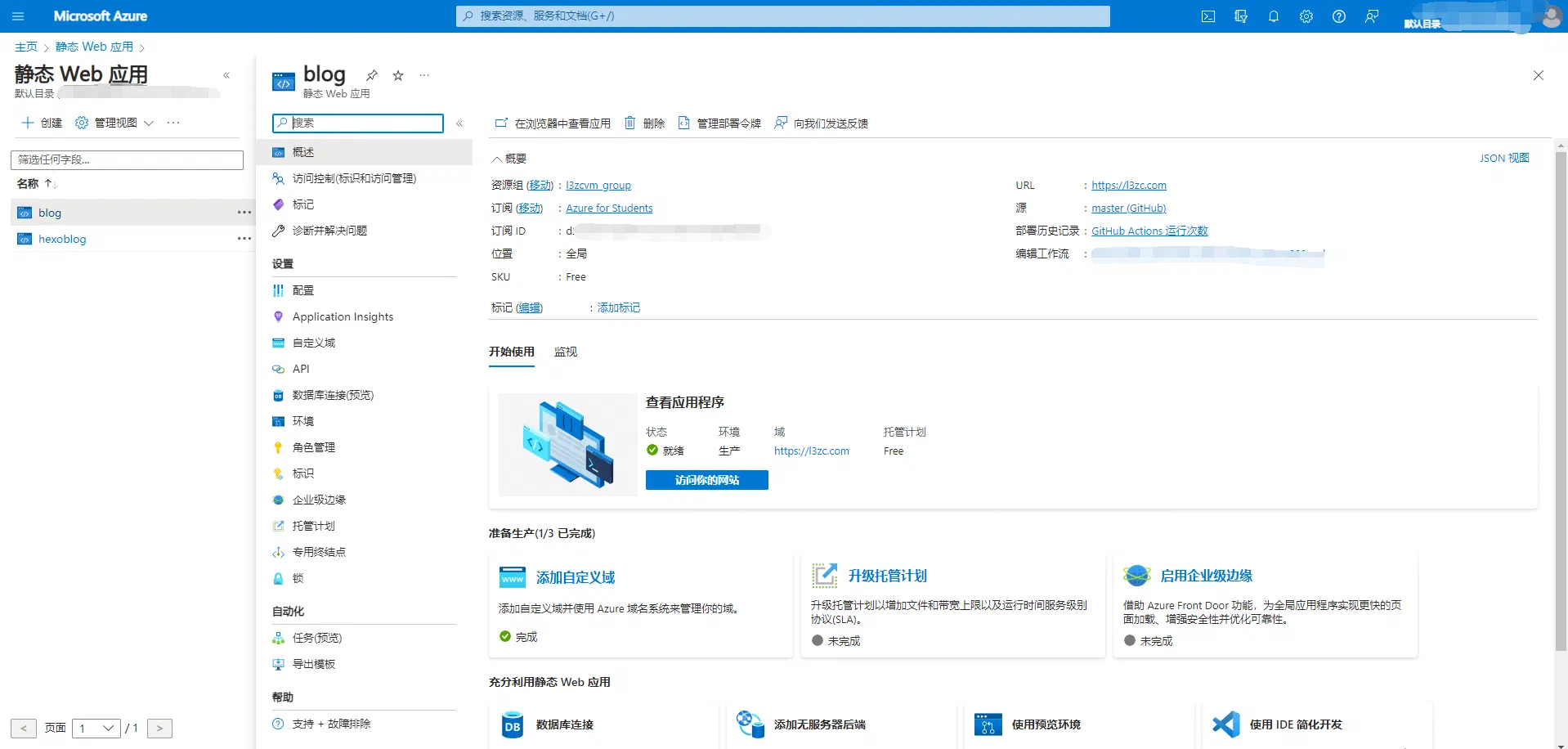
Azure SWA 面板

最佳化hugo-theme-stack

換用國內前端資源 CDN

hugo-theme-stack前端資源大量採用了 JSDelivr,然而:
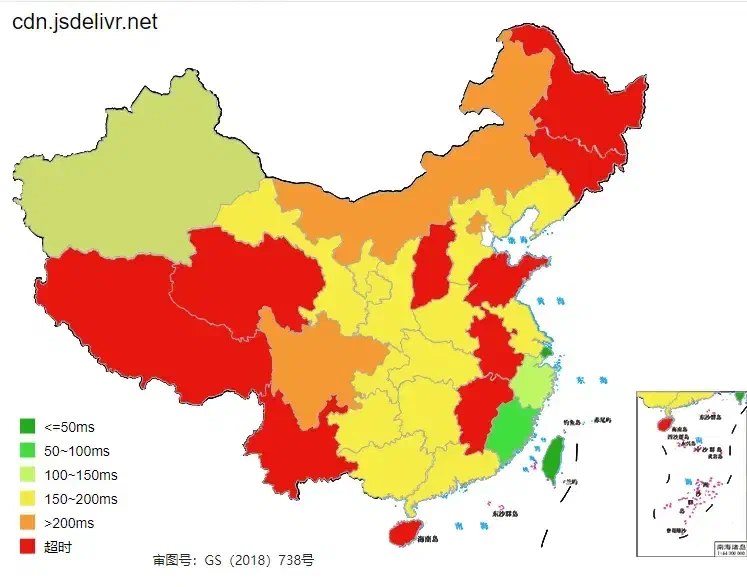
JSDelivr現狀

可以看到,有些地方預設的 JSDelivr 前端資源甚至完全不可用。因此,更換這些前端資源成了當務之急。

由於我們使用的是模組形式載入hugo-theme-stack,根本就沒有themes資料夾。Hugo 允許主題檔案的覆蓋4,只需要將需要覆蓋的檔案放在 working directory 即可。例如:我想修改原本在./themes/layouts/partials/head/下的custom.html,只需建立./layouts/partials/head/custom.html然後編輯,這個檔案可以從原主題倉庫複製。

hugo-theme-stack將透過外部載入的前端資源放在了./themes/data/external.yaml,我們在部落格目錄下建立./data/external.yaml

 1
 2
 3
 4
 5
 6
 7
 8
 9
10
11
12
13
14
15
16
17
18
19
20
21
22
23
24
25
26
27
28
29
30
31
32
33
34
35
36
37
38
Vibrant:
  - src:
    type: script

PhotoSwipe:
  - src: https://lib.baomitu.com/photoswipe/4.1.3/photoswipe.min.js
    type: script
    defer: true

  - src: https://lib.baomitu.com/photoswipe/4.1.3/photoswipe-ui-default.min.js
    type: script
    defer: true

  - src: https://lib.baomitu.com/photoswipe/4.1.3/default-skin/default-skin.min.css
    type: style

  - src: https://lib.baomitu.com/photoswipe/4.1.3/photoswipe.min.css
    type: style

KaTeX:
  - src: https://lib.baomitu.com/KaTeX/0.15.6/katex.min.css
    type: style

  - src: https://lib.baomitu.com/KaTeX/0.15.6/katex.min.js
    type: script
    defer: true

  - src: https://lib.baomitu.com/KaTeX/0.15.6/contrib/auto-render.min.js
    type: script
    defer: true

Cactus:
  - src: https://latest.cactus.chat/cactus.js
    integrity:
    type: script
  - src: https://latest.cactus.chat/style.css
    integrity:
    type: style

由於 Vibrant.js 不在lib.baomitu.com上,所以需要自行解決託管問題。

原專案裏這些前端資源還有個integrity鍵值用來校驗資源完整性,經測試似乎只有 JSDelivr 支援這個特性,這裏引用的 360 前端資源庫保留這個鍵值會報錯,於是一刪了之。實際上有了 https 加持,除非遇到國家級網絡攻擊這種極端的情況,我們也基本上用不到這個特性。

我還修改了./layouts/partials/helper/external.html,直接去掉了所有的 Integrity:

 1
 2
 3
 4
 5
 6
 7
 8
 9
10
11
12
13
14
15
16
17
18
19
20
21
{{- $List := index .Context.Site.Data.external .Namespace -}}
{{- with $List -}}
    {{- range . -}}
        {{- if eq .type "script" -}}
            <script
                src="{{ .src }}"
                {{ if .defer }}defer{{ end }}
                >
            </script>
        {{- else if eq .type "style" -}}
            <link
                rel="stylesheet"
                href="{{ .src }}"
            >
        {{- else -}}
            {{- errorf "Error: unknown external resource type: %s" .type -}}
        {{- end -}}
    {{- end -}}
{{- else -}}
    {{- errorf "Error: external resource '%s' is not found" .Namespace -}}
{{- end -}}

評論系統也引用了 JSDelivr,因此也要更換。我採用的評論系統是 Twikoo,建立./layouts/partials/comments/provider/twikoo.html,修改檔案第一行:

1
<script src="//lib.baomitu.com/twikoo/1.6.21/twikoo.all.min.js"></script>

原主題的 Twikoo 版本是1.16.115,這裏也順便升級成匹配我部署的後端版本1.16.21

其他的評論系統也以此類推。

新增圖片燈箱

原主題有一個「Image gallery」功能,但只支援本地圖片,這對於所有圖片都存在圖牀上的我來説顯然不是什麼好訊息。於是我只好自己新增一個圖片燈箱。

我原本準備採用 fancybox,畢竟我最熟悉這個,但 fancybox 需要引入 jQuery,這和我想讓部落格儘可能輕量化的初衷背道而馳。於是我找到了zoom-vanilla.js,雖然它也不完美,但論輕量是絕對夠格的。

首先需要在前端引入zoom-vanilla.min.jszoom.css這兩個資源,我直接丟進./static/引用,見仁見智。

將這兩個資源放入./static/imgzoom/後,分別在<head>內和<body>6引入 css 和 js:

修改./layouts/partials/head/custom.html

1
<link href="/imgzoom/zoom.css" rel="stylesheet" />

修改./layouts/partials/footer/custom.html

1
<script src="/imgzoom/zoom-vanilla.min.js"></script>

引入前端資源後需要為所有影象加上一個data-action="zoom"

修改./layouts/_default/_markup/render-image.html

 1
 2
 3
 4
 5
 6
 7
 8
 9
10
11
12
13
14
15
16
17
18
19
20
21
22
23
24
25
26
27
28
29
30
31
32
33
34
35
36
37
38
39
40
41
42
43
44
45
46
47
<img
  src="{{ $Permalink }}"
  {{
  with
  $Width
  }}width="{{ . }}"
  {{
  end
  }}
  {{
  with
  $Height
  }}height="{{ . }}"
  {{
  end
  }}
  {{
  with
  $Srcset
  }}srcset="{{ . }}"
  {{
  end
  }}
  loading="lazy"
  {{
  with
  $alt
  }}
  alt="{{ . }}"
  {{
  end
  }}
  {{
  if
  $galleryImage
  }}
  class="gallery-image"
  data-flex-grow="{{ div (mul $image.Width 100) $image.Height }}"
  data-flex-basis="{{ div (mul $image.Width 240) $image.Height }}px"
  {{
  else
  }}
  data-action="zoom"
  {{
  end
  }}
/>

同前面一樣,我也列出了這個檔案的一部分,真正修改的部分只有一個else分支和data-action="zoom"

至此,圖片燈箱新增完成。

變更 RSS 行為

這個其實有點超綱了,不過這個主題確實自定義了 RSS 模板。

RSS 遇到了兩個問題,一個是輸出了我全部 50+ 篇文章,檔案變得特別大,這顯然是不合理的;還有就是輸出了searchabout等與 RSS 毫不相干的頁面。

在配置檔案config.toml末端加上:

1
2
3
[services]
[services.rss]
limit = 10

可以把 RSS 輸出的文章數量限制在 10 篇。接下來處理不相關頁面的問題,其實限制輸出 10 篇文章已經解決了第二個問題的大部分。此時更新後的 Feed 依然會在第一個輸出about,而且輸出日期會隨着構建時間變化,暫不清楚是什麼原理導致的。

我的解決方案是引入一個新的 Front matter 鍵值nonRSS: true,編輯./layouts/_default/rss.xml的前部分:

 1
 2
 3
 4
 5
 6
 7
 8
 9
10
11
12
13
14
{{- $pctx := . -}}
{{- if .IsHome -}}{{ $pctx = .Site }}{{- end -}}
{{- $pages := slice -}}
{{- if or $.IsHome $.IsSection -}}
{{- $pages = $pctx.RegularPages -}}
{{- else -}}
{{- $pages = $pctx.Pages -}}
{{- end -}}
{{- $pages := where $pages "Params.hidden" "!=" true -}}
{{- $pages := where $pages "Params.nonRSS" "!=" true -}}	//加入這一行
{{- $limit := .Site.Config.Services.RSS.Limit -}}
{{- if ge $limit 1 -}}
{{- $pages = $pages | first $limit -}}
{{- end -}}

重新構建就修好了 RSS Feed。

建議搜尋引擎不索引「標籤」頁面

不知道為什麼,搜尋引擎總是喜歡把我的標籤頁面編入索引7,我決定給每個 Tag 頁面加上一個noindex標記。並且用robots.txt排除這些頁面。編輯baseof.html,在<head>部分加入如下內容:

1
2
3
{{ if .Data.Singular }}
<meta name="robots" content="noindex" />
{{ end }}

這樣應該會給每個 Tag 頁面加入一個noindex標記。

./static/下建立robots.txt

1
2
User-Agent: *
Disallow: /tags/

這樣就可以把所有 Tag 頁面排除索引。


  1. 作者 JimmyCai 似乎住在西班牙 ↩︎

  2. Azure 的邊緣計算,https://github.com/microsoft/Oryx。 ↩︎

  3. 透過 Actions 呼叫 Oryx。 ↩︎

  4. 詳見Hugo官網:Anytime Hugo looks for a matching template, it will first check the working directory before looking in the theme directory. If you would like to modify a template, simply create that template in your local layouts directory. ↩︎

  5. 現在已經升級成1.16.21PR#877 ↩︎

  6. 至少作者是這麼説的,我放在<footer>也照樣用。 ↩︎

  7. 可能是因為站點地圖 ↩︎

採用 CC BY-NC-SA 4.0 協議進行許可
上次改過於 2026 年 3 月 17 日 13:08 +0800